

Whether you're a seasoned online seller or just getting started with farming e-commerce, preparing your farm e-commerce store for 2026 is a smart move.
As we head into a new year, having a strong online presence matters more than ever for farms selling direct to customers. A well-structured farm e-commerce store can become one of your most reliable sales channels, helping you reach new buyers while making it easier for existing customers to place repeat orders.
Creating a farm store online goes beyond simply uploading products. High-performing farm e-commerce stores are easy to navigate, visually clear, and kept up to date. Customers want to quickly understand what you sell, how to order, and when they can expect pickup or delivery.
This article shares practical tips for listing farm items online and setting up a farm e-commerce store that converts. From improving product listings to strengthening your storefront experience, these best practices will help you build a more effective online farm store and drive consistent sales throughout the year ahead.
4 tips for listing farm items online for guaranteed sales
Creating a farm store online doesn’t need to be complicated. Online farm e-commerce platforms like Local Line make it easy to get started. Here are our top tips for setting up your farm e-commerce store with Local Line:
1. Create an e-commerce farm store online
First and foremost, if you’re not already selling farm items online – what are you waiting for? An easy-to-use, reliable storefront helps your online traffic convert to customers and sales. If you haven’t heard of us, Local Line is a user-friendly, all-in-one sales platform for farmers and food hubs. Getting set up is easy. Once you log in, start uploading your products, defining your fulfillment plans, inviting customers, and managing your orders.
➡️ For a full step-by-step on how to get your online store up and running, check out this article!
If you already have an online store, now is the time to prep it for the year. Take some time to reflect on the past year. Are there any updates you can make to your existing storefront?
- Do you have any products that you don't plan on selling next year? Are you adding new products this year?
- How are you packaging your products? Which packages were more or less popular last year?
- Has your inventory management system changed?
- How did you organize your products this year? Did you leverage categories?
- If you aggregate other vendors' products, how did you display this on your storefront?
Taking the time to review and update your farm store can help you get prepped and ready for a busy new year.

2. Get your farm price lists ready
Next, get sales-ready by segmenting your customers into unique price lists. Local Line gives you the ability to leverage the same inventory into different unique storefronts. A price list is your “shoppable” list of products on your online store. For your different sales channels, your pricing, pack size, and availability might change. For each customer type, you can create a unique price list to reflect this.
As you prep for the next year, take the time to map out all of your different customer segments (i.e., wholesale, CSA, retail, etc.) and organize your offerings into your different price lists. You might need to make updates to your packages, pricing, and create a new price for a new sales channel. With Local Line, pricing plans have varying included price lists to meet your needs. You can also add additional price lists to your subscription for $29/month.
You can also set up automated emails that get sent out to the members of your price list on a pre-determined schedule. This is a great tool to re-engage customers to put in their orders. You can set these up in your Price Lists settings inside Local Line.
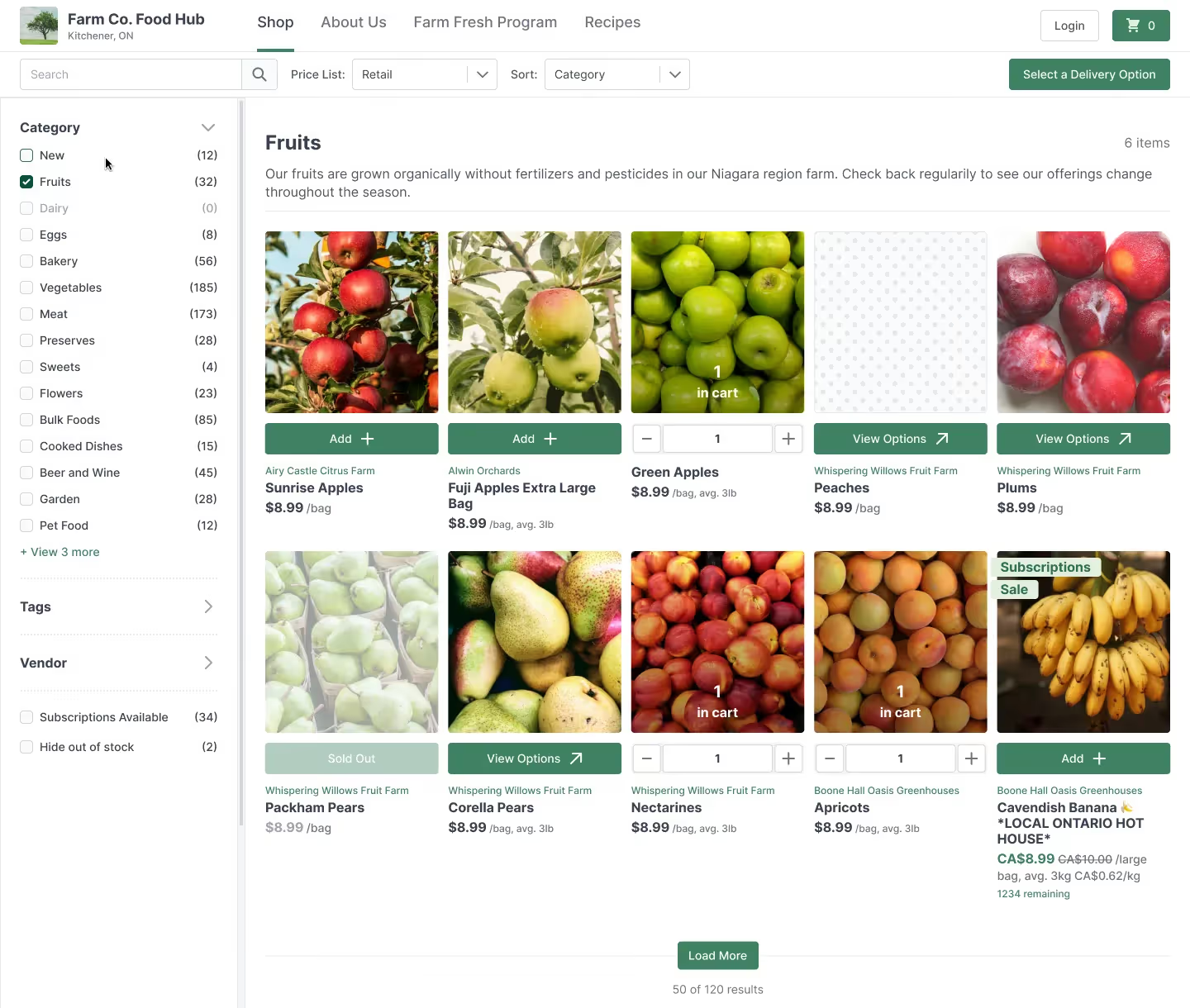
3. Upload impactful product images
Make your products pop on the page. High-quality product images are a must. Clear, well-lit, and professionally taken photos showcase your products effectively. Make sure to capture the uniqueness and freshness of your farm's products. High-resolution images help customers make informed decisions and enhance their online shopping experience.
Some quick tips for taking high-quality photos?
- Pick the Best Subject: Use produce that is bright in colour and has the least amount of blemishes. We all know there’s nothing wrong with a piece of fruit that has a few bumps and bruises, but for marketing purposes, pick your best-looking products. Additionally, determine how you are going to represent the product. This means whether you only showcase one unit or a handful, or whether the product is cooked or uncooked in the photo. Depending on your branding and product type, the representation may change.
- Create a Background: Take your photos with natural scenery. Small-scale farming practices are all about natural and ethical production of food. Taking a photo of your final product with natural scenery in the background helps connect the product itself with its production. If that’s not possible, consider using natural fabrics, textures, and tones as the background of your photos—this will help make the link to handmade and natural production. Helpful tip: Amazon has photo studio "boxes" for an easy, white background with great lighting. Find them here in a range of sizes and prices.
- Be Mindful of Lighting: Avoid shadows. When you take a photo of something straight from above, shadows occur and can dominate a photo. Adjust the angle of shooting, to reduce the intrusion of shadows in your pictures. Additionally, always use natural light. Flash photography and artificial lighting can be very hard to work with and often don’t look that great.
➡️ For even more tips on how to take professional product photos, check out this blog post!
4. Update your product descriptions
Accurate and compelling product descriptions are essential to attract and inform potential buyers. Use descriptive language, highlight the key features of your products, and include any relevant information such as production methods, pairings or recommended uses, and flavor profiles. Create a consistent style for your descriptions to maintain a professional appearance.
Pro tip: Include the most important information in the first sentence of your product description. This copy will display on the home page of your online store. Not all of the copy will display on your storefront – so be sure to pick and choose what you want to show first.
What are the best practices for setting up an online farm store?
If you are building or refining your store, these best practices help improve conversion and customer experience.
Keep ordering simple
Customers should understand how to order within seconds. Clear buttons, straightforward checkout, and visible fulfillment details reduce drop-off.
Be clear about fulfillment
State pickup locations, delivery areas, order deadlines, and timing clearly. Uncertainty leads to abandoned carts.
Organize products logically
Use categories that match how customers shop, such as produce, meat, pantry items, or bundles.
Optimize for mobile
Many customers browse and order from their phones. Your store should load quickly and display cleanly on smaller screens.
Build trust signals
Use product photos, detailed descriptions, reviews, and farm information to reassure first-time buyers.
Keep inventory accurate
Out-of-stock products frustrate customers. Regular inventory updates help prevent missed expectations and manual follow-up.
Final thoughts. Set your farm up for a stronger sales year
Preparing your farm e-commerce store is one of the highest-impact steps you can take to drive consistent revenue. A clear storefront, thoughtful pricing, strong visuals, and accurate product information all work together to convert more customers with less effort.
Local Line gives farms the tools to manage online sales, price lists, inventory, and customer communication in one place. Whether you are launching your first store or refining an existing one, the right setup makes selling online easier and more reliable.
If you are ready to prep your farm’s online store for higher sales, Local Line can help you get there faster.
Sign up for Local Line now - it takes only a few minutes to get started!