New free tool: Scan and grade your farm's website.
Try Now→
Most of the time lost on pack day goes to the list, not the lifting. Here are seven ways to fix it, with lessons from Deck Family Farm, who got 10 hours back every order cycle.

Most of the time lost on pack day isn't spent lifting crates. It goes to re-printing lists, chasing late changes, asking who packed what, and fixing boxes that went out wrong. Food hubs doing this by hand routinely report spending 8 or more hours a week on pick and pack lists alone.
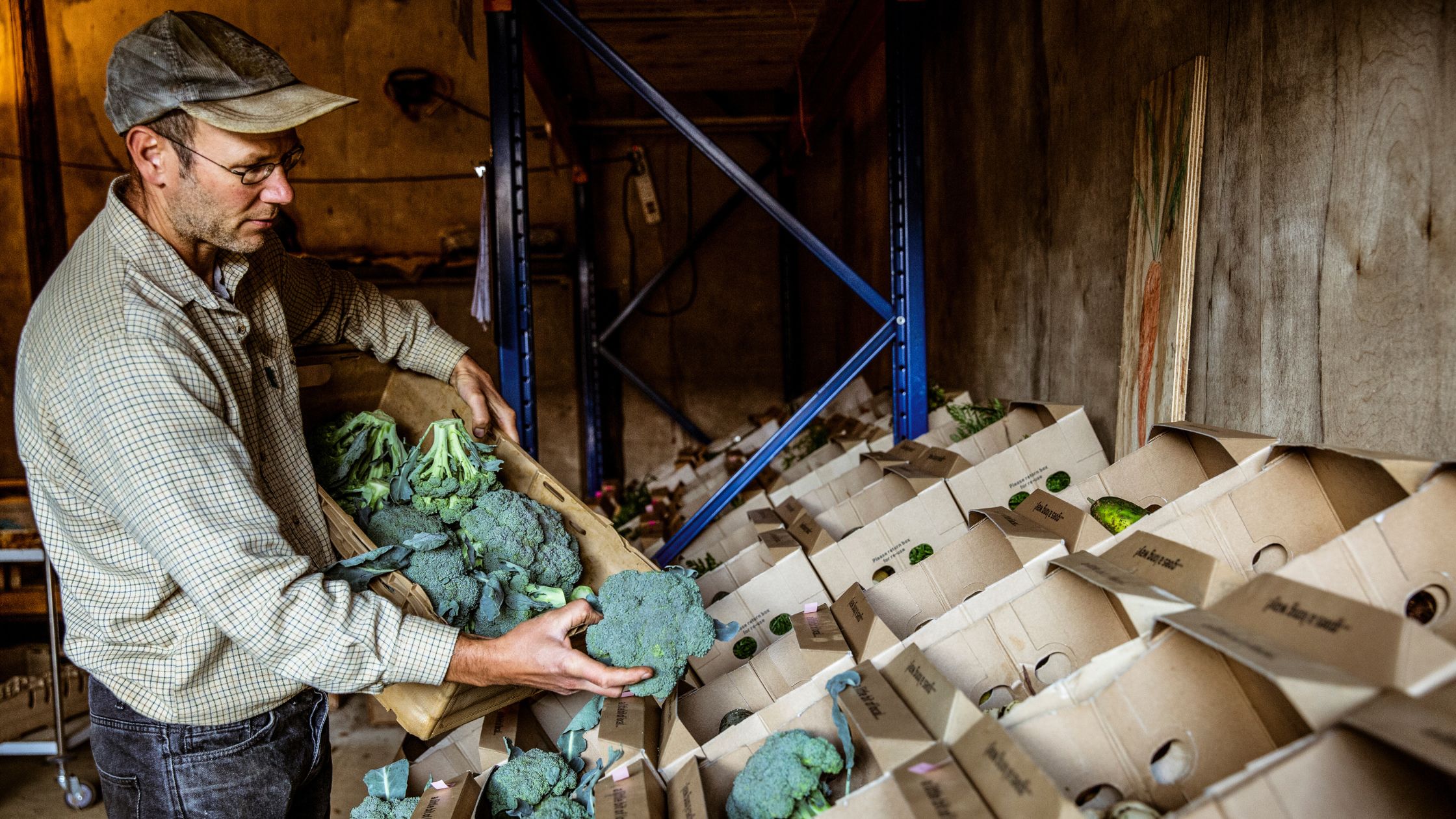
John Deck knows that math well. He and his wife Christine run Deck Family Farm, a 300-member full farm CSA in Oregon, with laying hens, broilers, a market garden and a raw milk dairy. Once they stopped packing from generic lists and started using lists set out by weight, vendor and product type, their crew stopped walking back and forth across the farm. They got about 10 hours back every order cycle, or 20 hours a week, and made fewer mistakes along the way.
The lesson from Deck Family Farm is that faster packing rarely comes from asking the crew to move faster. It comes from fixing the list: one that's out of date, sorted the wrong way, or unclear about who has done what. This guide covers seven ways to do it, whether you run a CSA, a food hub, or a preorder and delivery business.
"It probably saves us 10 hours of work for every order cycle, so 20 hours a week." John Deck, Deck Family Farm
On a printout, every late change sends the crew back to re-print, re-mark and re-check. On a live list, the list absorbs the change and the crew keeps working.
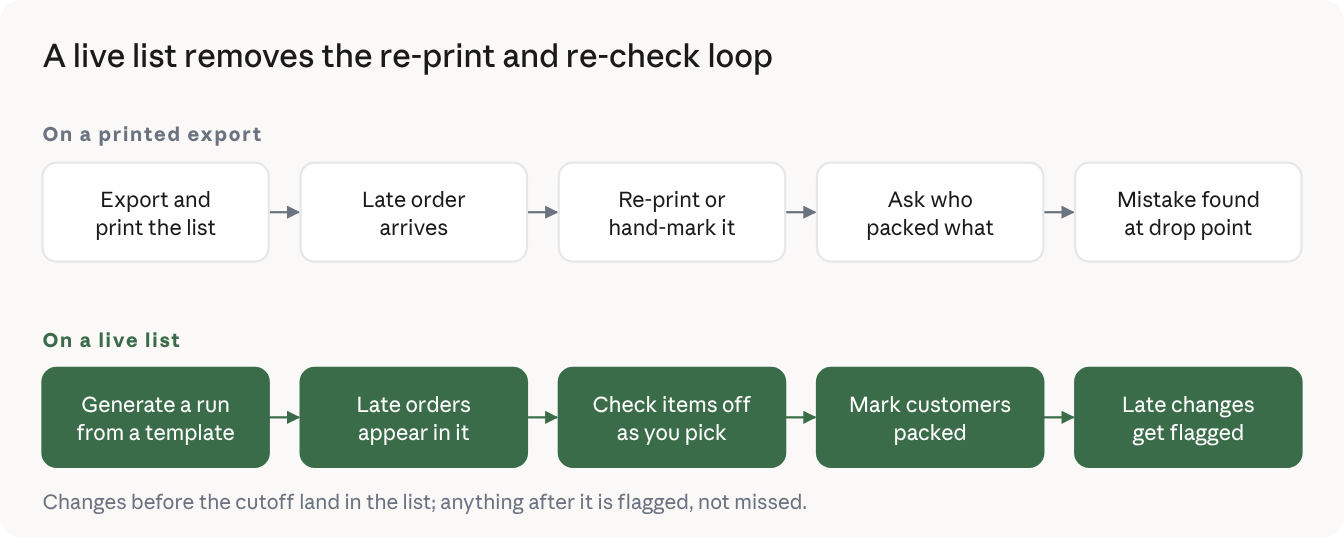
A printed pick list is right for about as long as it takes to walk it to the packing table. Then a late order lands, a customer cancels, or kale gets swapped for chard. Each change has to be caught, passed along and hand-marked, and each one is a chance for a box to go out wrong.
The fix is one source of truth that updates until your order deadline, and tells you about anything that changes after it.
Tip: if you're still on paper, write the print time on every sheet. Anyone holding a sheet older than the latest order re-prints before picking starts.
When one person pulls product and builds boxes at the same time, they walk the whole room once per order. Splitting the job cuts that walking. Pickers pull everything needed in total, by product, and stage it. Packers then build each box, by customer, from product that's already waiting.
This is the assembly-line approach from How to Pack 100 Orders an Hour for Your Food Hub, and it works at any size. Even a two-person crew moves faster with one picking and one packing.
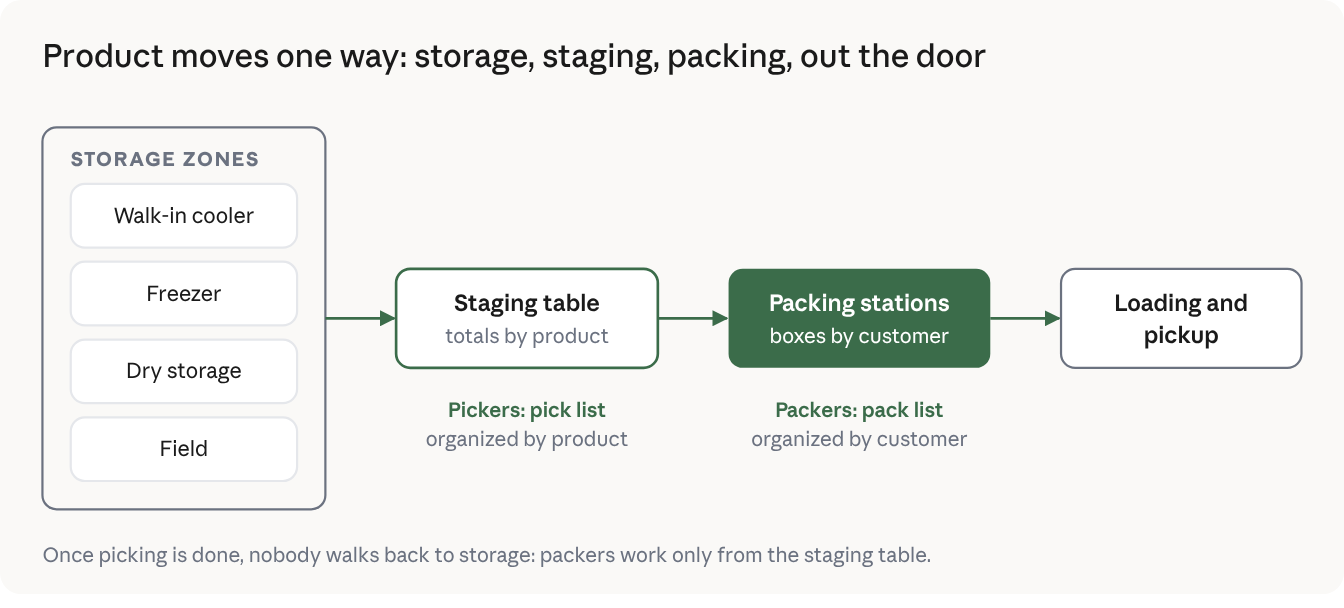
An alphabetical list sends your crew zig-zagging: apples in the walk-in, basil in the greenhouse, beef in the freezer, then back to the walk-in for carrots. Sort and group the list the way your space is laid out, so the crew moves in one direction and never doubles back.
The easiest way to do this is with tags. In Local Line, packing tags are labels you create and assign to products: a zone like Walk-in or Freezer, a weight class, or whatever fits your operation. You can then group your pick and pack lists by tag, so everything in one zone lands together, or filter a list by tag so the freezer crew only sees frozen items.
"This system prevents staff from walking back and forth, saving significant time." John Deck, Deck Family Farm, whose lists set out a packing order by weight, vendor and product type
Rebuilding the same report every week is a setup tax you pay every pack day. Decide once what each job's list should look like, save it, and reuse it every cycle. Most operations need a few setups, not one.
Tip: list every report or sheet your team uses in a week. Most operations find two or three they rebuild by hand every time. Those are your first templates.
"Did someone already pack the Martinez box?" Every time that question gets asked, two people stop working. Track progress in one place everyone can see: items checked as they're picked, customers marked as their box is done. Anyone can glance at the list and see what's left.
Without a firm cutoff, changes trickle in right up to pack day, and every one costs time. The operations that pack fastest run on a fixed cycle: the ordering window opens, it closes at a set time, then the crew picks, packs and delivers.
Jade Vincent of The Best Milk Lady serves more than 200 customers a week with nine partner farms and a two-person team. Her week runs the same way every time.
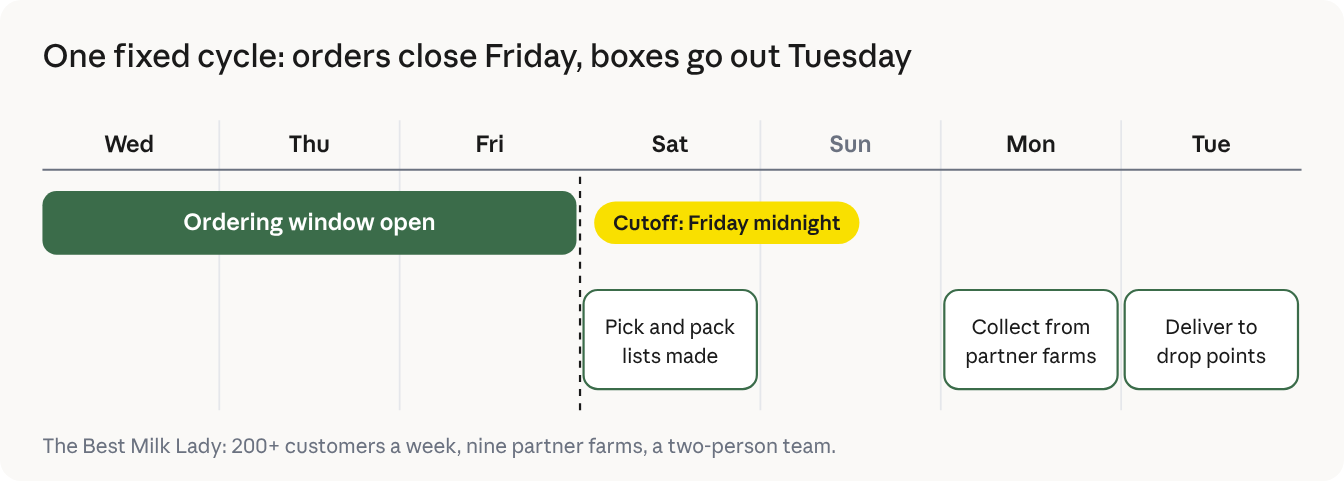
"In a delivery business, the profit margins are already so low. You have to be very careful with your time, and this definitely streamlined everything for us." Jade Vincent, The Best Milk Lady
Tip: write your cycle on a whiteboard by the packing table: when orders open, when they close, and when picking starts.
A mistake a customer finds costs far more than one caught at the packing table: the refund, the apology, the extra trip. Speed only counts if the boxes are right. As John Deck puts it: "We're really trying to reduce the number of mistakes we make."
Build accuracy into the routine:
Every way in this guide works on paper. Live Pick & Pack Lists make them automatic: they take the static exports you already use and turn them into lists your team works in as they pick and pack. They're free and included in every Local Line plan, under Orders > Pick & Pack.
A template saves which orders appear (filters) and how they display: columns, sorting and grouping. Set up one for the field crew, one for wholesale, one for delivery day, and reuse them every cycle.
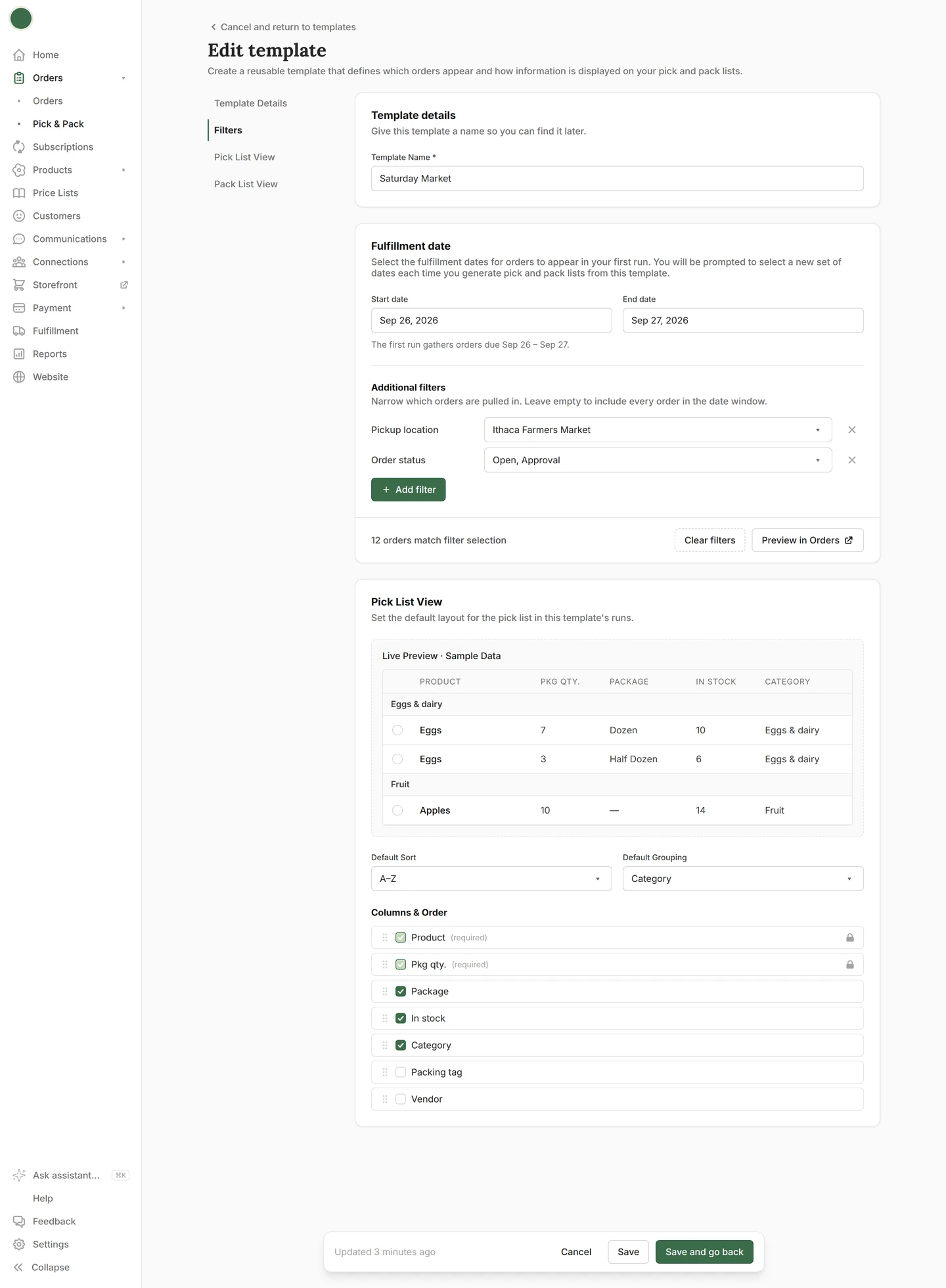
Each week, generate a run from a template for the dates you're packing. The run stays current until your order deadline, so late orders, cancellations and changes appear as they happen. Anything that changes after the deadline is flagged.
Every run has a pick list organized by product and a pack list organized by customer, each set up separately. Pickers and packers each see only what they need.
Create packing tags for anything that matters on pack day, such as zone or weight, and assign them to products. Then group a pick or pack list by tag so each zone's items sit together, or filter a list by tag to give each crew member only the items in their area.
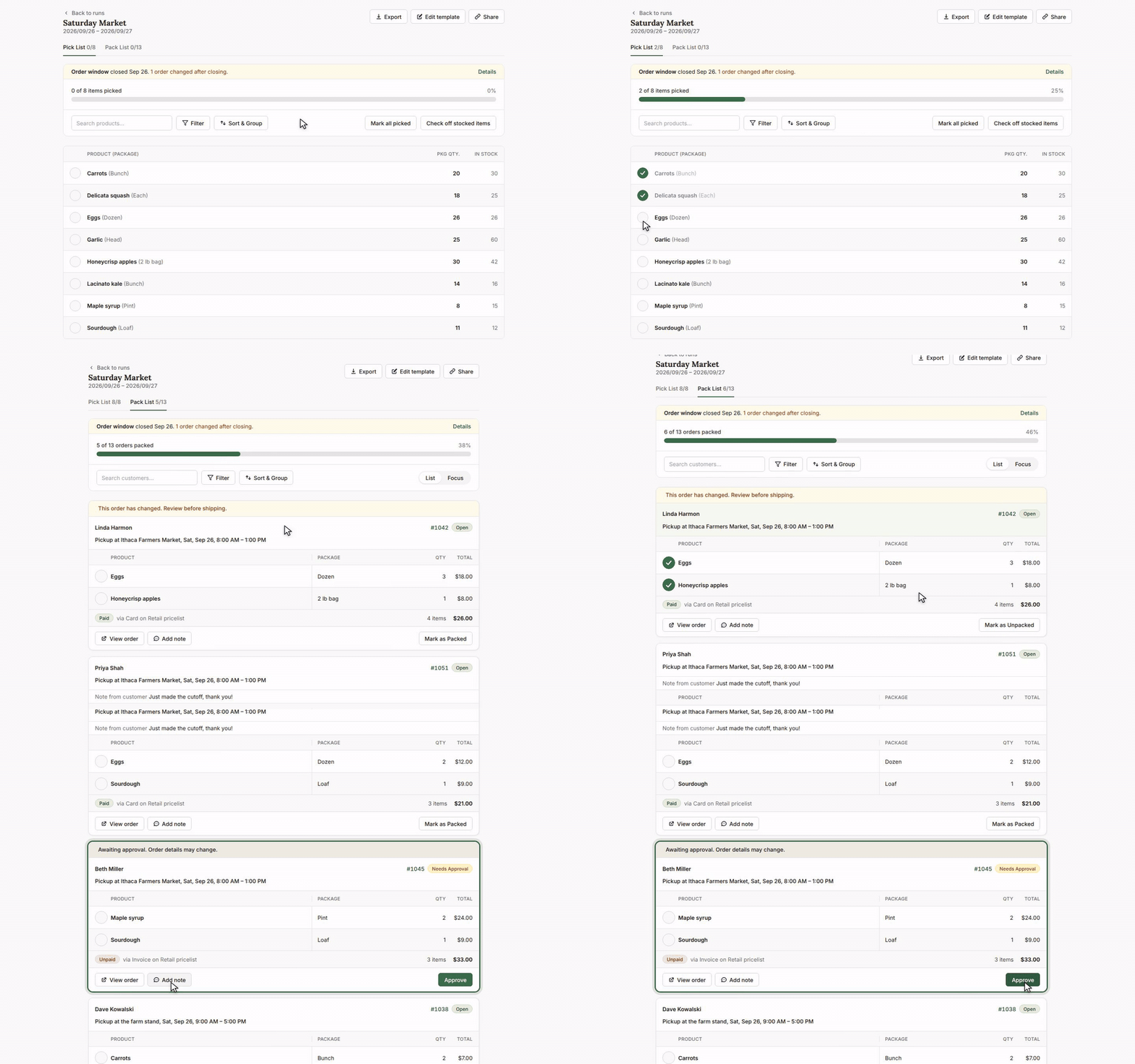
Check items off as you pick and mark customers packed as you pack. Everyone logged in to your Local Line account sees the same status. Quick actions let you approve an order, add a note or open the order without leaving the list.
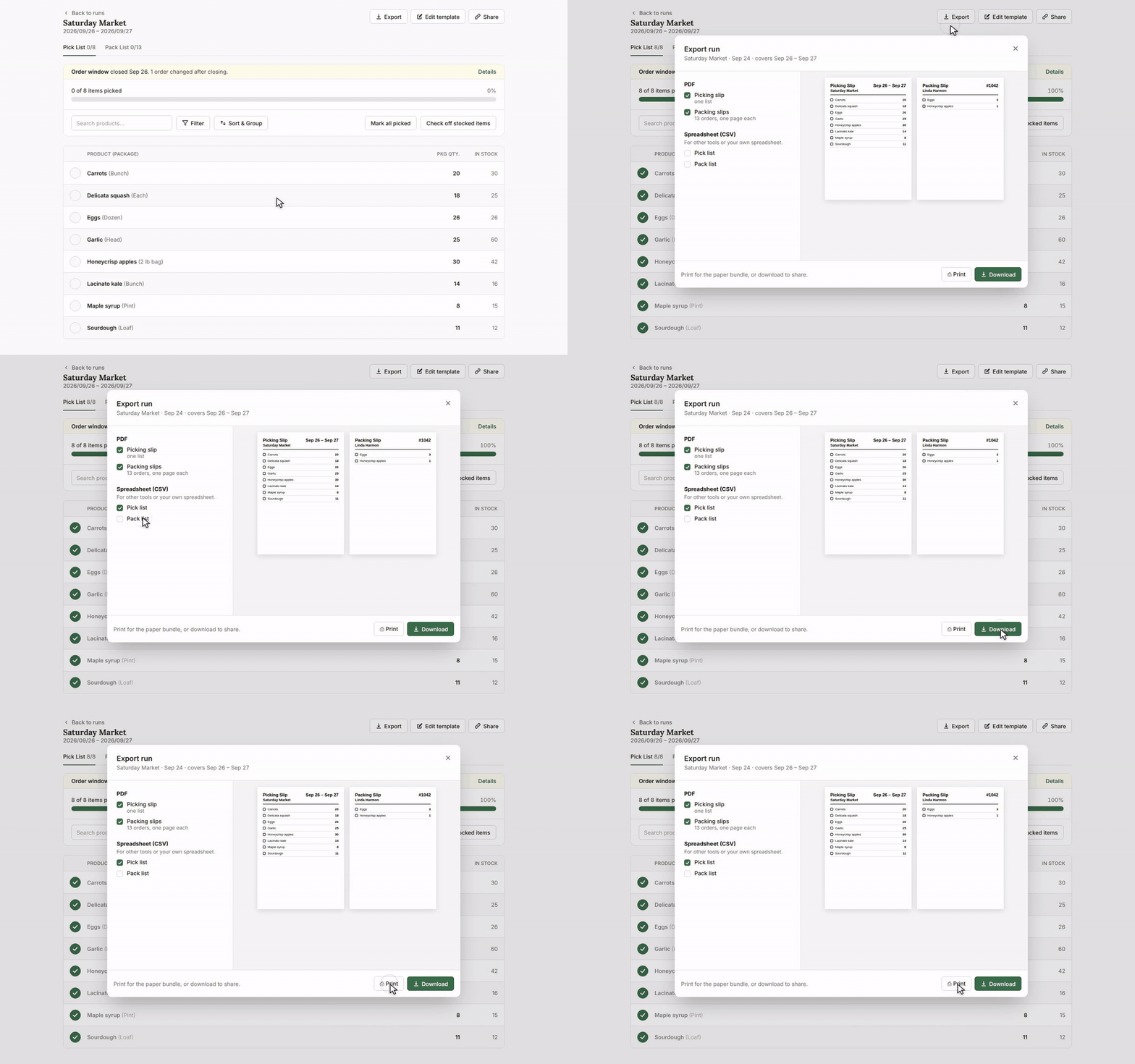
Export any run to CSV, or print pick and packing slips as PDFs. Every printout is stamped with the dates it covers and the time it was printed, so nobody packs from last week's sheet.
Cutting pick and pack time in half doesn't take a bigger crew or a faster pace. It takes a better list. When your team works from one list that stays accurate up to the deadline, split by product and by customer, sorted to match the room and saved as a template, most of the wasted motion on pack day disappears. Add a shared way to check items off, a weekly rhythm your customers can count on, and a habit of catching mistakes before boxes leave the table, and the hours start coming back. Deck Family Farm got 10 of them back every order cycle. Start with one or two of these changes on your next pack day, see what they free up, and build from there.
Nina Galle is the co-author of Ready Farmer One and a specialist in farm e-commerce, CSA management, and digital wholesale marketplaces. Over the past eight years, she has worked with thousands of family farms implement online ordering systems, subscription models, and wholesale distribution strategies. At Local Line, Nina focuses on helping farmers sell direct-to-consumer, manage CSA programs, and access new wholesale sales channels.
More by this author →.avif)