Is your farm's website losing you sales? Get a free grade in 3 mins.
Grade my site →
Running a CSA well is not about having a sign-up form. Here is how to run sign-ups, payments, swaps, and packing from one system, so your CSA runs the same way every week.


Running a CSA well is not about having a sign-up form. It is about getting the whole week out of your inbox: who paid, who is skipping, who swapped the kale, and how many boxes go to which pickup spot.
Most CSAs already have some kind of sign-up form. The trouble starts after that, when payments live in one tool, swaps come in by text, and the packing list is a spreadsheet someone rebuilds every Sunday night. That works at 40 members. At 200, it is where the mistakes and the late nights come from.
The farms that run their CSA well have one thing in common. Every member action, from registering to skipping a week to adding a dozen eggs, lands in the same system that builds the harvest list and the packing list. Nothing gets retyped.
Our view is that you should design your CSA around the weekly cycle first and the sign-up page second. If the week runs cleanly, growth is just more of the same week.
This guide walks through how to run a CSA in six steps, from choosing your model to setting a weekly rhythm, then covers the tools you need and how Local Line brings them together. Along the way, you will see how City's Edge Farm, Shrock Family Farm, Plan B Organic Farms, and Cooper's CSA Farm run theirs.
Your CSA model decides how members pay, how much they choose, and how much work lands on you each week. Decide this first, because every setting after it follows from the model.
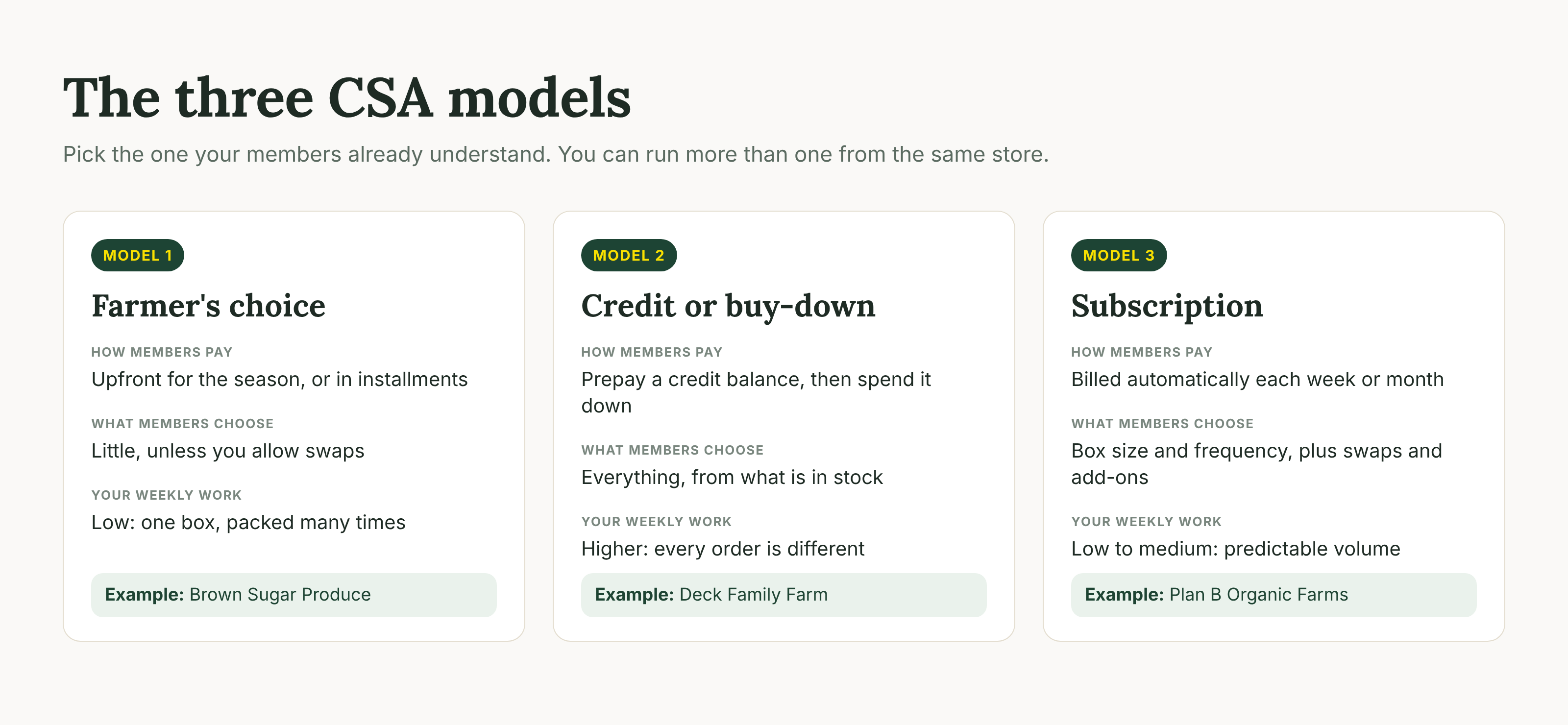
Most CSAs run one of three models, or a mix of them. We cover each in depth in our guide to the three CSA models, but here is how they compare week to week.
Shrock Family Farm runs two CSA models side by side. Their Farmer's Choice CSA offers predetermined weekly boxes across spring, summer, and fall seasons. Their Choice CSA lets members prepay a credit tier of $200 to $500 and pick their own produce each week. Both run from one storefront, one inventory, and one fulfillment workflow.
"Once they get purchasing vegetables, they just keep doing that," Shelly Shrock says of her Choice CSA members. About half of them top up their credit before the season ends.
The takeaway: start with the model your members already understand, then add a second option once your weekly workflow is stable.
Your CSA registration should live in the same store members will order from all season. When sign-ups happen on a separate form, someone has to copy every member, share type, and payment into the system that runs the week.
At City's Edge Farm, a three-acre certified organic farm on Vancouver Island, CSA registration runs through the same Local Line storefront Sol Kinnis uses for weekly retail sales. Members:
"It saved me a lot of time," Sol says of running registration through her store.
How members pay matters as much as how they sign up. A few approaches we see working well:
Store credit is a prepaid balance saved on the member's account. It is applied automatically at checkout, so nobody has to track balances in a spreadsheet.
City's Edge also sells a sample box in its store. Many people who try it go on to sign up for a weekly share. If your CSA sells out slowly, a sample box is a simple way to turn storefront shoppers into members.
.jpg)
Customer spotlight
Central Saanich, BC
Sol Kinnis runs her weekly storefront, annual CSA registration, and food hub invoicing from one Local Line account.
Read the full story“It was specifically designed for farmers and charged a flat rate,” Sol says.
Members want some choice, and you need a box you can pack fast. The way to give both is controlled flexibility: you define the box and the allowed swaps, and members make changes themselves.
Without a system for this, swaps arrive by email and text, and someone has to remember them on pack day. That is where the wrong item ends up in the wrong box.
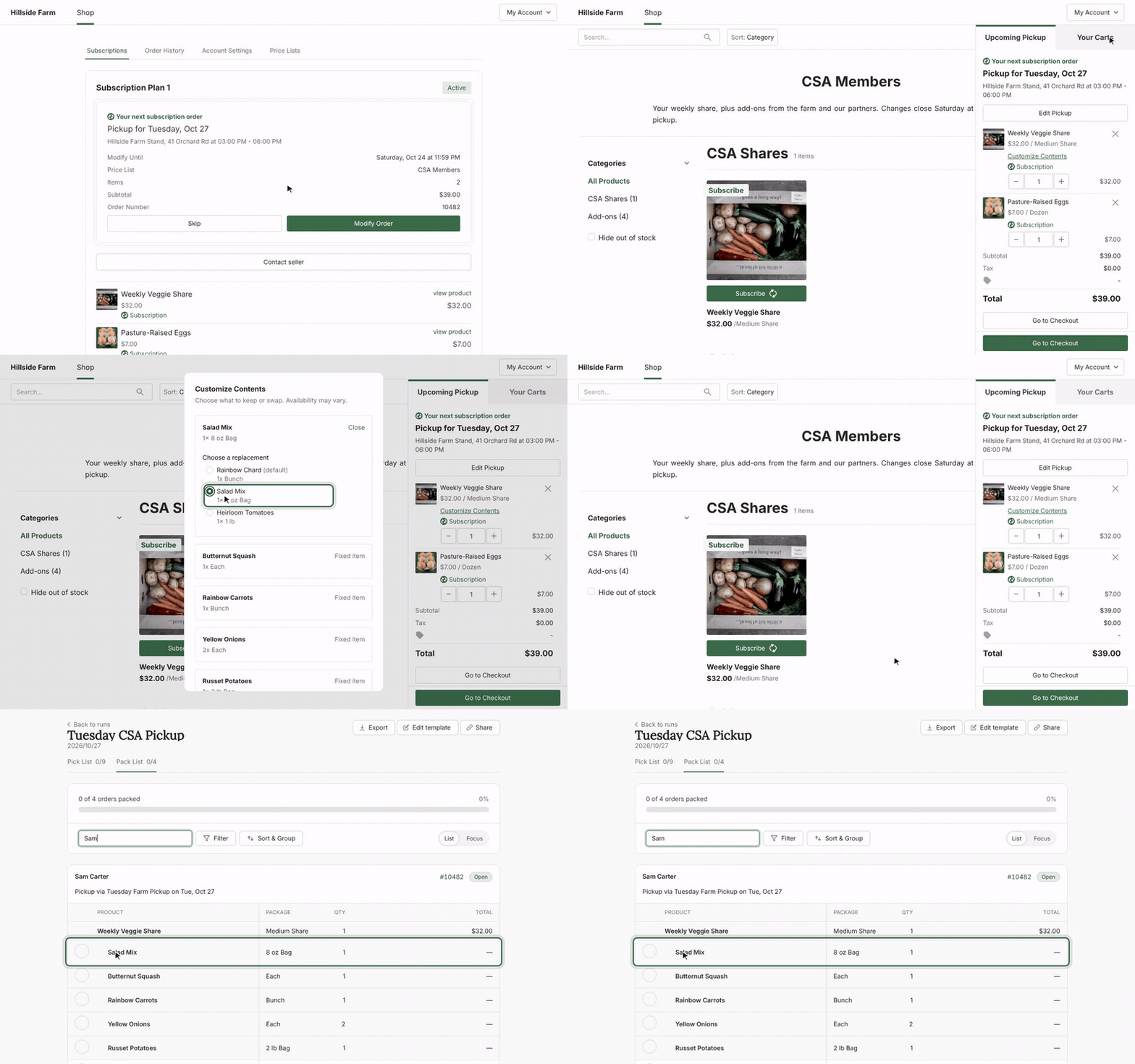
Box Builder lets you set what goes into each week's box. You then decide which items members can swap out, what they can swap in, and how many changes each box allows.
Members can:
Every swap updates inventory and flows into your pick and pack lists automatically, so the list your crew packs from always matches what members chose.
If you sell a subscription CSA and a regular storefront from the same inventory, there is a timing risk. A one-time shopper could buy the last of something already promised to a subscriber.
Local Line now reserves inventory for upcoming subscription orders. When a subscription's draft order is created ahead of delivery, the stock it needs is set aside. Storefront customers can only buy what is left. Your products table shows both numbers, so you can see on-hand inventory and what is still available to sell.
The takeaway: let members customize, but always inside limits that are tied to real inventory.
Flexibility keeps members, and add-ons grow revenue. Both only work if members can do them on their own and the changes land in your orders without anyone retyping them.
Members go on vacation. If the only way to skip is to email the farm, some will cancel instead. With subscriptions in Local Line, members skip a delivery, pause, or cancel from their own account. Orders, inventory, and pack lists update automatically.
This matters most when your program has a lot of variations. Plan B Organic Farms serves 300+ weekly customers across 10+ cities and 40+ pickup locations, with small and large boxes, weekly and biweekly delivery, and a local-only option in winter. Self-serve changes are what make that many combinations manageable.
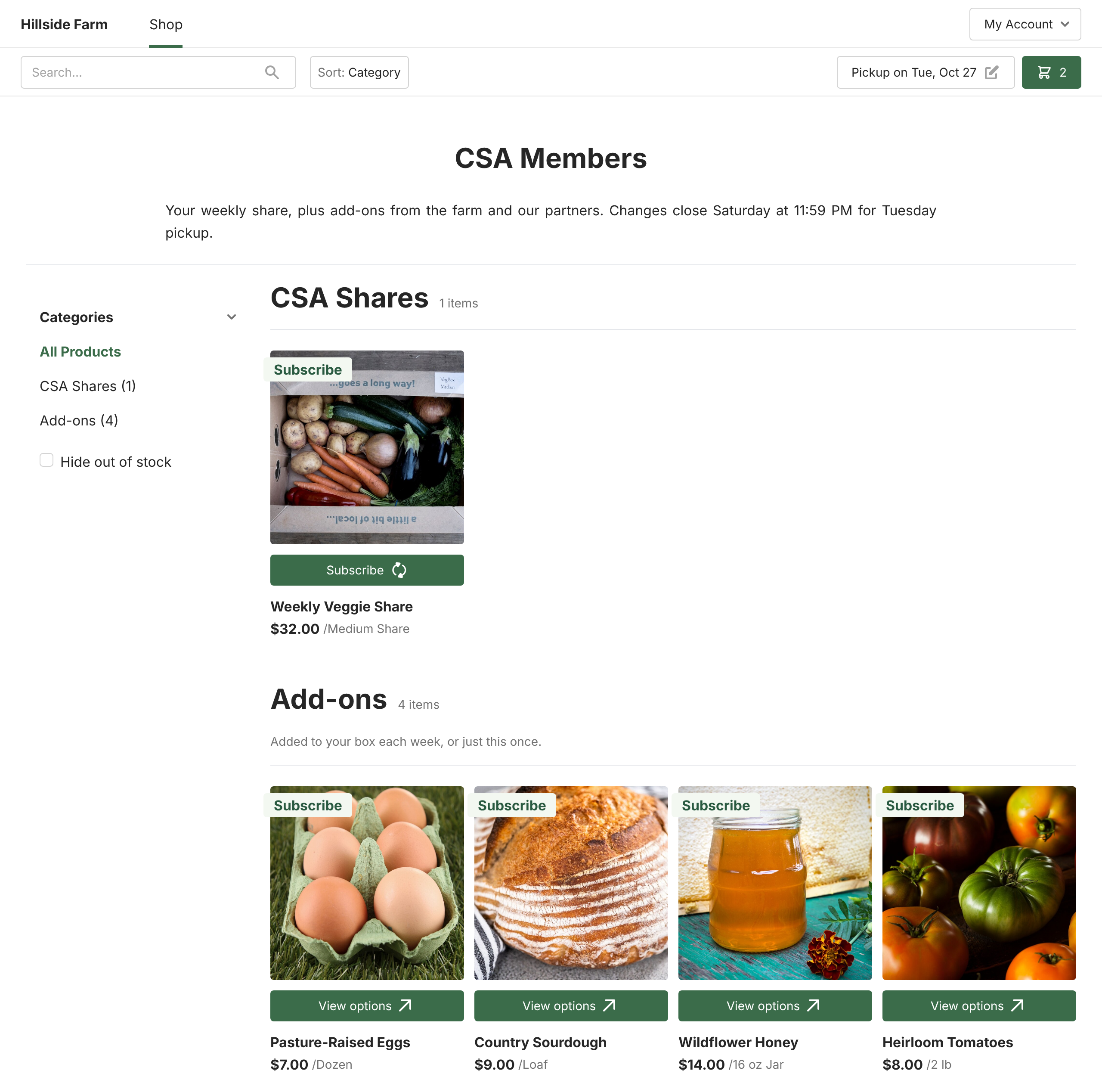
Your CSA members are already coming to pick up a box. Giving them a way to add eggs, bread, meat, or extra produce to that same order is the simplest sales growth available to most CSAs.
The usual setup is a private price list that only CSA members can see. Members shop it each week and their extras are packed into the same box, paid with a card or their store credit.
Brown Sugar Produce earns an extra $500 to $800 a week from add-ons sold to CSA members through a members-only price list. Read the story
Sol Kinnis at City's Edge Farm sees the same pattern. Her main store customers are CSA members ordering extras for their pickup. Many former members keep buying a la carte after their share ends, sometimes more than their old share.
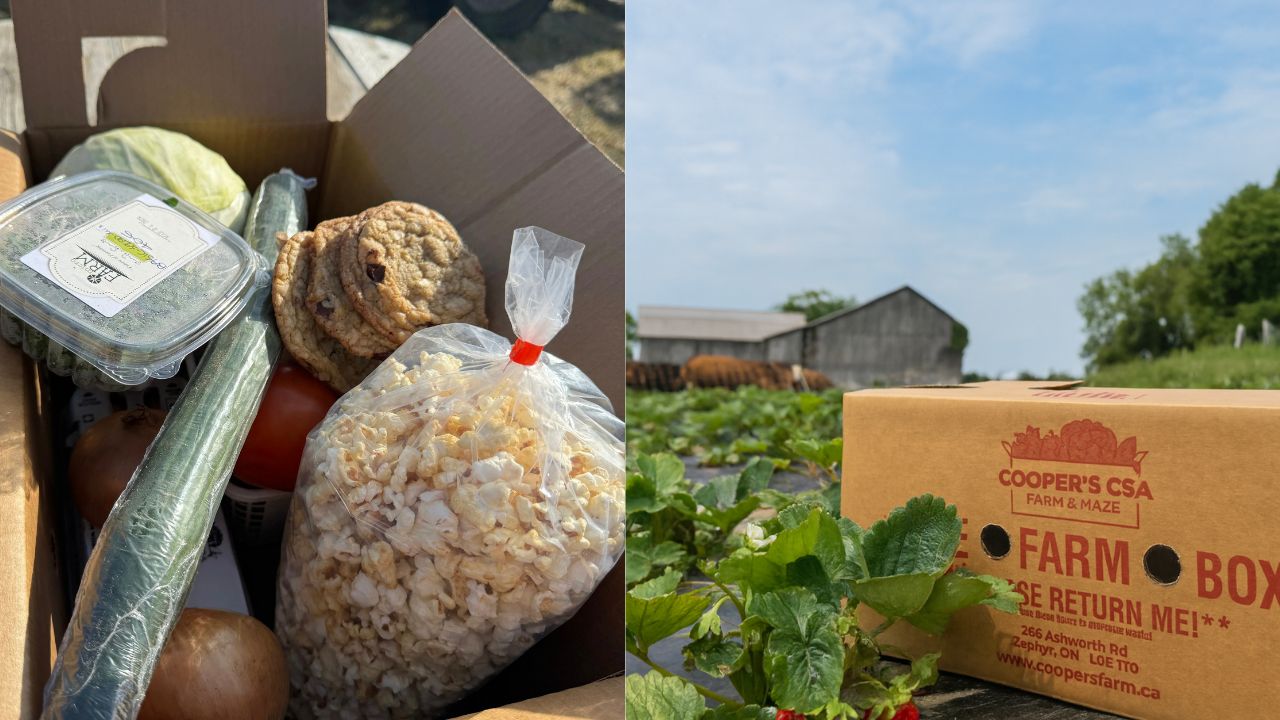
Cooper's CSA Farm takes flexibility a step further. Members customize and schedule their own boxes, and "some customers want to order every week, others once a month, it all works," Steve Cooper says. 85% of their customers order twice or more per month.
Your harvest list and packing list should come straight from the week's orders, not from a spreadsheet someone rebuilds by hand. If you have done Steps 2 to 4, every sign-up, swap, skip, and add-on is already in your orders. Pack day is where that pays off.
Two lists do most of the work:
Local Line's Live Pick & Pack Lists are built once from a template and reused every week. Each week's list stays current until your order deadline, so late orders, swaps, and cancellations show up without reprinting. If something changes after the deadline, the list flags it.
Your whole team works from the same list. Crew members check off items as they pick and mark each customer as packed, so nobody packs the same box twice. You can still print packing slips or export to a spreadsheet when you need paper.
Deck Family Farm runs a fully customizable credit CSA for more than 300 members. Automating credit tracking and fulfillment saved them 20 hours a week.
At Shrock Family Farm, pick lists printed from Local Line guide both harvest and packing, and orders route to the right drop-off: a weekly drop-off night, the farmers' market, or the farm.
The takeaway: if anyone on your team is tallying orders by hand, that is the first job to hand to software.
A CSA runs smoothly when members know exactly when to order and when to pick up, and the same reminders go out at the same time every week. Pick your days once, then automate the messages.
Here is the rhythm Plan B Organic Farms uses for a year-round CSA with Sunday harvests. Use it as a starting point and shift the days to fit your farm.
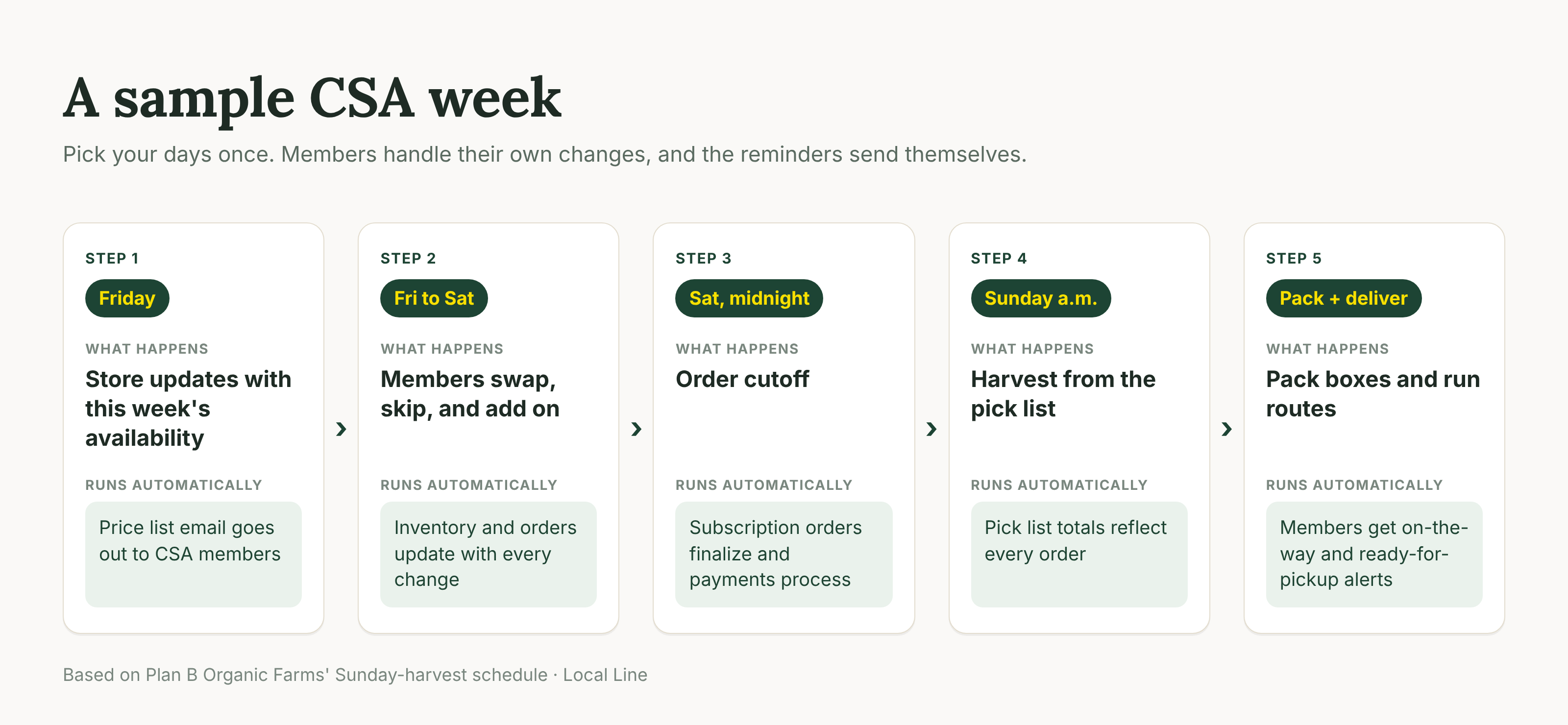
"Our cutoff is Saturday at midnight, since we harvest Sunday mornings," says Melanie of Plan B. Every Friday, their store updates and an automated price list email goes to CSA subscribers. The farm tracks opens, clicks, and bounces for that email in Local Line.
Every step above depends on a handful of tools. Most CSAs start by stitching them together: a form for sign-ups, a payment processor, a spreadsheet for orders, and an email app for reminders. That works for a season or two, until the same member has to be updated in four places.
Our view is that the specific tools matter less than one rule: they should all work from the same set of orders. If a skip in one tool doesn't change the pack list in another, someone on your team becomes the connection between them.
Here is the core stack every CSA needs, and the signs your current setup is running out of room.
If three or more of those right-hand cells sound familiar, the problem is no longer any single tool. It is that the tools don't talk to each other.
Local Line is CSA software built for farms that sell through a CSA and other channels at the same time. Every tool in the stack above lives in one system, working from one set of orders, so a member's sign-up, swap, skip, or add-on shows up everywhere it needs to without anyone retyping it.
Few CSAs only sell shares. Most also sell at a farmers' market, a farm stand, or to a restaurant or food hub. Local Line runs those channels from the same inventory, using separate price lists for each group of customers.
That is how City's Edge Farm runs its CSA registration, weekly store, and food hub invoicing in about two to five hours a week. It is also how Shrock Family Farm runs two CSA models from one storefront. And if you sell in person, Square Sync brings market sales into the same system.
Switching systems mid-season is the reason many CSAs stay on tools they have outgrown. Local Line migrates your members, products, and orders for free and sets up your delivery zones for you. Support is staffed 9am to 9pm EST, seven days a week.
Customer spotlight
Zephyr, Ontario
Steve and Lisa Cooper moved their 46-week CSA to Local Line right before their busy season, with customer data, orders, and delivery zones migrated for them.
Read the full story“They even built out our delivery zones across Toronto, which would have taken us weeks to do on our own,” Lisa says.
Growth is not the hard part of a CSA. Running the same week cleanly, 20 or 46 times a year, is. When sign-ups, payments, swaps, skips, and add-ons all land in one system, the harvest list and pack list build themselves and adding members stops adding admin.
Local Line gives CSAs one place to run registration, store credit, subscriptions, box customization, add-on sales, and live pick and pack lists. Farms on Local Line grow sales by an average of 33% per year, and we migrate your members and products for free.
Nina Galle is the co-author of Ready Farmer One and a specialist in farm e-commerce, CSA management, and digital wholesale marketplaces. Over the past eight years, she has worked with thousands of family farms implement online ordering systems, subscription models, and wholesale distribution strategies. At Local Line, Nina focuses on helping farmers sell direct-to-consumer, manage CSA programs, and access new wholesale sales channels.
More by this author →.avif)