New free tool: Scan and grade your farm's website.
Try Now→
The fix isn't replacing all your tools with one. It's making sure every channel reports into the same system. Square stays Square. Your card reader stays your card reader. But every transaction lands in one place automatically.


Selling food today doesn’t happen in one place. You might take credit cards at the farmers market on Saturday, run an online store for weekly pickups, charge CSA members on a recurring schedule, and invoice your wholesale buyers at the end of the month. Each of those channels comes with its own payment setup — and if they aren’t talking to each other, you’re the one stuck reconciling at the end of the week.
In this guide, we walk through every payment a modern farm needs to handle, what your options are at each one, the fees you can expect, and how to keep it all in one place without giving up the tools that already work for you.
Want to simplify your setup? Book a quick demo call for free.
A decade ago, accepting payments mostly meant taking cash at the farm gate or running a card through a clunky reader at the market. Today, the same farm is often running an online storefront for direct-to-consumer orders, managing standing wholesale accounts, fulfilling weekly CSA boxes, and still showing up to the Saturday market.
That’s good news. More channels mean more revenue. But it also means more places where money comes in, more tools to manage, and more reconciliation at the end of the week. Most farmers we talk to are running at least two separate systems, usually an online store with one provider and an in-person setup with another, and stitching the two together by hand on Sunday night.
The goal of this guide is to help you stop doing that. Not by adopting one new tool, but by setting up a payment system where each channel does what it does best and they all report into the same place.
Before we get into specific tools, it helps to map out where money actually comes in. Most farms sell through some combination of these channels, and each one has different ideal payment methods, fee structures, and customer expectations.
The next few sections walk through each one in detail, covering what to expect, what to set up, and how to make sure transactions from each channel feed back into a single system.
This is the channel where the most farms are using a separate tool from their main software, and where the most reconciliation pain shows up. For most farms, in-person sales are also a meaningful share of total revenue, sometimes 30% to 50% of weekly sales during peak season, which means getting this channel right has a disproportionate impact on the rest of the operation.
If you’re already running a market booth or farm stand, there’s a good chance you’re using Square. The hardware is cheap, the app is easy, the reader fits in your apron pocket, and customers know what to do when they see it. There’s no reason to switch.
The problem isn’t Square itself. The problem is what happens after Saturday. You sell forty pints of strawberries at the market. Your online store still shows forty pints in stock. Sunday morning, three customers order strawberries online that you don’t actually have. Now you’re emailing apologies and refunding orders, and you still haven’t updated your inventory for Monday.
The good news: there’s now a way to keep using Square exactly as you do today and still have every transaction land in Local Line automatically. That feature is Square Sync.
We're happy to walk through what it would look like for your specific accounts. Book a quick demo call for free.
Square Sync connects your two systems in both directions:
Manage your products, quantities, and availability inside Local Line. When you sync a price list to Square, all your products, packages, pricing, and inventory appear automatically inside the Square ecosystem. Your Square POS, terminal, and app always show accurate, up-to-date stock. Manual entry is no longer required.

Every transaction processed through Square is automatically created as an order in Local Line, marked as paid, and tagged with a Square attribute so you know exactly where it came from. Inventory is deducted in real time. Your reports and analytics stay current without any extra work on your end. You can easily pull sales reports for each sales channel inside Local Line.
Square Sync is built for any farm or food hub that sells in person alongside their online operation:
If you’re selling in person and managing the rest of your business in Local Line, Square Sync closes the loop. If you’re not using Local Line yet, the value of this integration is one of the strongest reasons to start.
For online orders, the question isn’t whether to accept credit cards. Customers expect it. The question is which gateway to run them through, because that decision affects your fees, your refund workflow, your subscription billing, and how well payments connect to the rest of your operation.
There are three reasonable options for most farms. Each has trade-offs worth understanding before you commit.
LocalPay is Local Line’s own payment gateway. It accepts Visa, Mastercard, AMEX, and Discover for credit cards, plus ACH and EFT bank transfers for larger orders. Because it’s built directly into Local Line, refunds happen in the same place you manage the order — no jumping between systems.
Rates depend on your Local Line plan and are typically lower than the standard 2.9% + $0.30 you’ll see elsewhere. On the Premium plan, for example, credit card rates drop to 2.7% + $0.30. On a farm doing $10,000 a month in card sales, that two-tenths-of-a-percent difference is around $240 a year.
The bigger win with LocalPay isn’t the rate. It’s the integration. When everything happens inside one system, the sale, the payment, the refund, the reporting, there’s nothing to reconcile and nothing to forget. It’s also the only gateway that gives you ACH and EFT as built-in options, which matters a lot once you’re doing any meaningful wholesale volume.
Stripe is a strong general-purpose option if you already have an account or use it for other parts of your business. It connects to Local Line through your payment gateway settings and handles the same standard credit cards. Stripe also has strong support for international cards if you’re shipping or accepting orders from outside your home country, which is occasionally relevant for farms selling specialty products to chefs across borders.
Rates with Stripe are standard: 2.9% + $0.30 for most card types. Refunds and disputes are handled in the Stripe dashboard rather than inside Local Line, which is a small but real source of friction if you’re used to managing everything in one place.
Square is best if you’re already using it in person. With Square Sync, you can also accept Square payments online through the same account, which keeps your reporting clean across both channels. Square’s online rates are similar to Stripe: typically 2.9% + $0.30.
CSA and subscription sales have one specific requirement that one-off orders don’t: you need to be able to charge customers automatically on a recurring schedule without asking for their card details every week.
Inside Local Line, customers can save their payment method to their account during their first checkout. After that, the system handles recurring charges on whatever schedule you’ve set—weekly, biweekly, monthly—using either credit card or ACH depending on what they’ve saved.
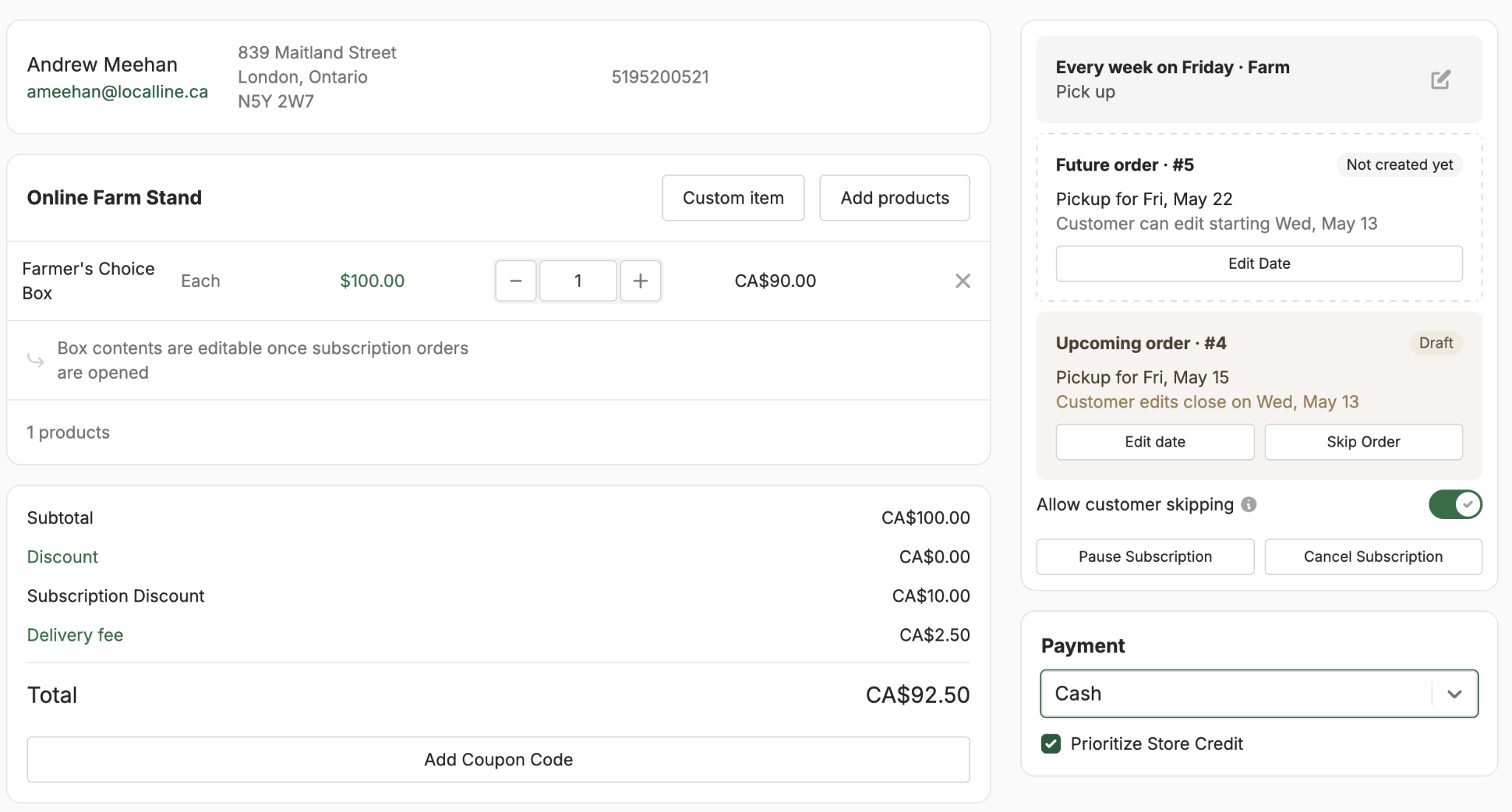
A few details worth knowing for CSA payments specifically:
Customers can also manage their own subscription details from their account: pausing a delivery, changing the share size for a single week, or cancelling. Billing automatically adjusts to match.
Wholesale is where payment fees can quietly eat the most margin, because order values are larger. A 2.9% credit card fee on a $15,000 order is $435. That same order paid by ACH would cost about $50, the maximum ACH fee on most platforms, which means the effective rate is well under 1%.
For wholesale, the standard playbook looks like this:
Not every transaction fits a credit card or bank transfer. Some customers prefer cash. Some pay by check. Some Canadian customers want to use Interac e-transfer. Some longtime wholesale buyers will hand you an envelope at the loading dock. A good payment setup makes room for all of these without forcing you to track them in a separate spreadsheet.
Local Line lets you set up custom offline payment methods for the way your customers actually want to pay:
You can add instructions for each method so customers know exactly what to do at checkout (“E-transfer to payments@yourfarm.com with your order number as the message”), and you can apply custom fees to any of them if you want to recover processing costs.
The key with offline methods is that even though the money doesn’t move through Local Line directly, the order still does. You mark it as paid when the cash or check or e-transfer arrives, and from then on it behaves like any other paid order in your reports and inventory.
There’s no single right answer, but here’s a rough framework for matching payment methods to channels. This is the cheat sheet to come back to when you’re setting up a new channel or evaluating whether your current setup is right.
The most important thing isn’t which specific tools you pick. It’s making sure they all report into the same system so you’re not reconciling four different dashboards on Sunday night. If you remember nothing else from this guide, remember that: pick tools that talk to each other.
Paying too much in fees? Book a quick demo call for free.
A handful of tactical lessons that come up consistently in conversations with farms scaling their payment setup.
Customers convert at higher rates when they see a method they’re comfortable with. Even if 95% of your customers use credit card, the 5% who prefer ACH or e-transfer often represent your largest orders.
If a customer has to figure out which method to use, or follow a complicated set of steps, some of them will give up. Label methods clearly with their use cases, default to the most common option, and keep the checkout flow simple.
Cash, check, e-transfer, card — it all needs to end up in Local Line, even if the money moves outside of it. If a transaction isn’t in your system, your inventory will drift.
Wholesale buyers expect to pay processing fees if they choose credit card over ACH. Adding an optional fee for card payments is standard practice and won’t cost you customers.
To summarize the toolkit: Local Line is built to be the single system of record for every payment your farm processes, regardless of which channel it originated from.
Yes. Square Sync is built specifically so you can keep using Square, the app, the reader, the terminal, whatever works for you in person,while every transaction automatically syncs back to Local Line. You don’t have to switch payment processors or learn a new POS.
It connects your Square account to Local Line in both directions. Inventory and product info flows from Local Line to Square, so your POS always has accurate stock. Sales flow from Square back to Local Line as paid orders, with inventory deducted in real time. Setup takes a few minutes inside your Local Line payment gateway settings.
Square Sync is included in all Local Line plans at no additional cost. You’ll still pay Square’s standard processing fees on transactions, and Local Line’s standard subscription fee.
All three accept credit cards. LocalPay is built directly into Local Line, which means refunds, reporting, and reconciliation happen in one place. LocalPay also offers ACH and EFT, which Square doesn’t, making it a stronger choice for wholesale. Rates vary by plan but are typically lower than the standard 2.9% + $0.30. Stripe and Square are good options if you already have accounts or are committed to those ecosystems.
Yes. Local Line lets you add an optional fee to any payment method, set as either a dollar amount or a percentage. This is a common way for farms to keep card payments available without absorbing the full cost themselves. Be sure to check local regulations. Some jurisdictions have rules about how credit card surcharges must be disclosed.
No. You can use whatever Square hardware you already have, such as the standard Square reader, the Square Terminal, or the Square Stand.
When you sync a Local Line price list to Square through Square Sync, each price list appears as a Location inside Square. So if you run different pricing or product selections at different markets, you can sync each as its own Location and select the right one when you set up at the booth.
Yes. Customers can save credit card or bank account details to their account during checkout, which makes future orders faster and is required for CSA and subscription orders that charge automatically on a recurring schedule.
Local Line is built for the way farms actually sell, online, in person, on subscription, and to wholesale buyers, all reporting from the same source of truth. With Square Sync, you can finally close the loop between your market booth and your online operation without changing how you take payments.
If you’re already using Local Line, head to your payment gateway settings to connect Square Sync. If you’re not, the easiest way to see whether this setup makes sense for your farm is to walk through it with someone on our team.
Ready to see it in action? Book a free demo to see how Local Line and Square Sync work together for your farm.
Nina Galle is the co-author of Ready Farmer One and a specialist in farm e-commerce, CSA management, and digital wholesale marketplaces. Over the past eight years, she has worked with thousands of family farms implement online ordering systems, subscription models, and wholesale distribution strategies. At Local Line, Nina focuses on helping farmers sell direct-to-consumer, manage CSA programs, and access new wholesale sales channels.
More by this author →.avif)