
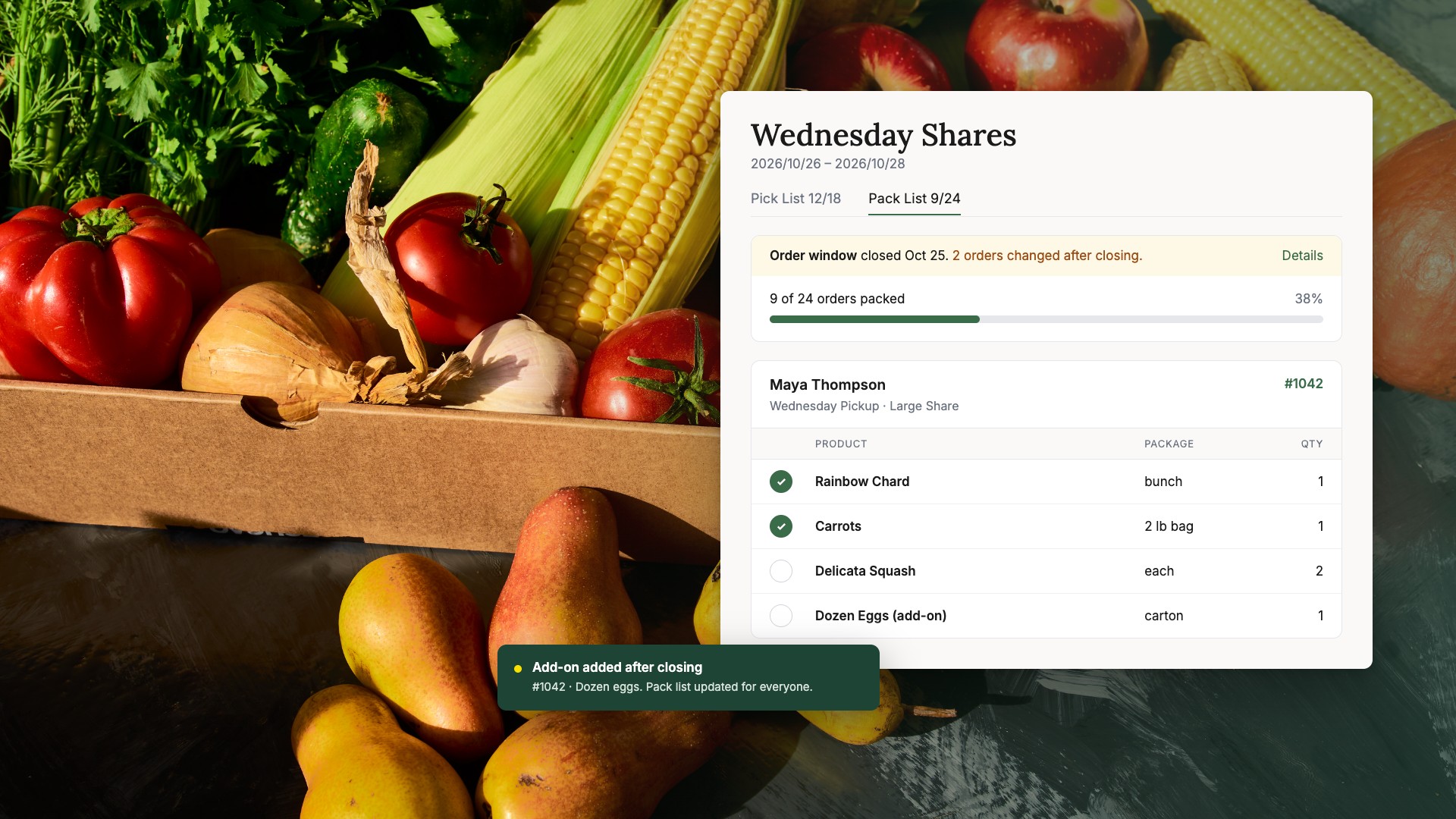
A missed add-on is never just a missing item. It turns into a refund, a follow-up email, and one more reason for a member to wonder what will be in next week's box.
Here is a familiar example. The boxes left the barn two hours ago, and a member writes to say the dozen eggs she paid for never made it into her share. Someone issues a credit, someone writes the apology, and someone tries to work out whether the eggs were missing from the pack sheet or simply left on the table. None of that work was on the pack day schedule.
Most CSAs know these mistakes happen. Far fewer know how often they happen, which kinds cost the most, or where in the workflow they start. Without that information, the fix usually becomes "be more careful," which asks a tired crew to work harder instead of giving them clearer instructions.
Our view is that CSA packing errors are a measurable workflow problem, not a crew problem. Count them for a few cycles and the pattern usually points to a specific handoff that broke, and a broken handoff can be fixed.
John Deck, who runs the 300-member Full Farm CSA at Deck Family Farm, describes the goal plainly: "We’re really trying to reduce the number of mistakes we make. It’s really important to run an excellent program that is efficient, and people are happy with the products," he says.
This playbook walks through how to name and log CSA packing errors as your season wraps up, how to turn that log into three numbers worth watching, and how pick and pack lists generated straight from orders keep the right instructions on the packing table. Along the way, we look at how Deck Family Farm and City's Edge Farm handle customized shares and extras.
Step 1: Name the Errors Worth Tracking
You can only measure what you have named, so start with a short, fixed list of error types. Four cover most CSA pack days, and each one tends to start somewhere different.
| Error Type | What It Looks Like | Where It Usually Starts |
|---|---|---|
| Missed add-on | A member's extra eggs, bread, or flowers never reach the box | The add-on lives on a separate order or sheet from the share |
| Wrong share size or quantity | A small share packed as a large, or two bunches instead of one | The pack sheet is unclear, or the member changed their order late |
| Unrecorded substitution | Kale goes in for chard, but the list still says chard | A swap was made at the table and never written down |
| Wrong location | A box lands at the Tuesday pickup instead of home delivery | Boxes are staged by memory instead of by fulfillment method |
Keep packing mistakes separate from upstream problems. If a member ordered something you never had in stock, or the order was entered wrong, that is an order-entry or availability issue, not a packing error. Log it, but in its own column, so it does not blur the picture of what happens at the table.
The rule we would give any CSA: for every error, ask where the instruction broke down, not who made the mistake. Packers can only pack what their list tells them.
Step 2: Log Every Error for Four Fulfillment Cycles
A simple shared log, kept for four fulfillment cycles, will tell you more than a season of memory. Four cycles is long enough to see a pattern and short enough that the crew will actually keep it up.
Give each error one row with these fields:
| Field | What to Record |
|---|---|
| Date | The pack day or fulfillment date |
| Order reference | The order number or member name |
| Error type | One of the four types from Step 1, or "upstream" |
| Where it was caught | At the packing table, at pickup, or reported by the member |
| Refund or replacement cost | Dollars credited, refunded, or spent on replacement product |
| Correction time | Minutes spent fixing it, including emails and extra trips |
| Likely cause | Where the instruction broke down |
Here is what a few weeks of that log can look like. Copy the layout into a shared spreadsheet and add a row for every error.
| Date | Order Reference | Error Type | Where It Was Caught | Refund or Replacement Cost | Correction Time | Likely Cause |
|---|---|---|---|---|---|---|
| Oct 7 | #1042 | Missed add-on | Reported by member | $6.00 credit | 15 min | Egg add-on was on a separate order from the share |
| Oct 7 | #1057 | Wrong share size or quantity | At the packing table | $0 | 3 min | Member switched to a small share after the list was printed |
| Oct 14 | #1103 | Unrecorded substitution | At pickup | $0 | 5 min | Kale swapped in for chard at the table, list not updated |
| Oct 14 | #1121 | Upstream | Reported by member | $4.50 refund | 10 min | Item sold out after the order was placed |
Log errors caught at the table too, not only the ones members report. Refund requests alone will miss every error a member shrugged off, and those still cost you trust.
Step 3: Turn the Log Into Three Numbers
At the end of each cycle, reduce the log to three numbers. Together they tell you how often errors happen, what they cost, and whether your checks are working.
Affected-order rate
Divide the number of orders with at least one confirmed packing error by the number of orders you fulfilled, then multiply by 100. Count each affected order once, even if it had two mistakes. As an example, 6 affected orders out of 120 fulfilled is an affected-order rate of 5%.
Correction cost
Add up refunds and credits, replacement product, and any extra delivery costs. Track staff time alongside it, in minutes, rather than converting it to dollars, unless you have already set a labor rate for your crew. Mixing the two without a rate makes the number harder to trust.
Caught before dispatch versus reported by members
Split your errors into those caught at the table and those members found at home. A rising share caught at the table is good news. It can mean your checks are improving, not that packing is getting worse.
Compare cycles with similar order volumes, so a holiday week or a short week does not skew the trend. Then look at which error type shows up most often and which costs the most. Those two are where you start.
Step 4: Find Where the Instruction Broke Down
Most packing errors trace back to one gap: what the member ordered did not reach the packer in a form they could follow. The more flexible your CSA, the wider that gap can get.
What this looks like with customized boxes at scale
Deck Family Farm's Full Farm CSA serves 300 members in Oregon. Members pay a monthly subscription and use their credit to build their own boxes, choosing from the farm's products and from items the farm sources from other local suppliers. That means close to 300 different boxes each cycle, not one standard share packed 300 times.
To keep that manageable, John uses customized pick and pack reports that set out the order products are packed in, based on weight, vendor, and product type, so staff are not walking back and forth across the packing area. "I don’t have to think about all the members putting in their orders and how that information is going to get translated," John says.
John estimates Local Line saves the farm about 10 hours of work every order cycle, or 20 hours a week. That figure reflects time saved across their whole Local Line workflow, not a measured drop in packing errors. Read the full Deck Family Farm story.
The takeaway: when every box is different, the pack list has to carry the order exactly as the member placed it, in the sequence your crew actually works.
What this looks like when members add extras
City's Edge Farm on Vancouver Island sells produce, flowers, and seedlings. Owner Sol Kinnis says many of her main online customers are CSA members ordering extras to collect with their CSA pickup, alongside customers who order what they want from the store each week instead of taking a share. She works from pick and pack exports, packing slips, and labels to fulfill those orders.
That mix is exactly where a missed add-on comes from. The share and the extra are two purchases, but the member expects them in one bag at one pickup.
The takeaway: if your members can add extras, the add-on and the share need to land on the same pack list, under the same member, before anyone starts packing.
Step 5: Pack From the Current Order, Not Last Night's Printout
The fastest way to close the gap is to generate pick and pack lists directly from orders, so the list your crew holds matches what members actually bought. A pick list totals each product across every order, so you know how much to harvest or pull. A pack list breaks those totals down by customer, so you know exactly what goes in each box.
Local Line's Live Pick & Pack Lists take this a step further by turning those lists into something your team works in on pack day. In CSA terms, the workflow has three parts:
- Save a template. A template is your reusable setup: which orders it pulls in and how the list is laid out, including columns, sorting, and grouping. You build it once, for example one for Wednesday shares and one for home delivery.
- Generate a run. A run is the actual list for a specific fulfillment date range, such as this Wednesday's boxes.
- Pick by product, then pack by member. Your crew checks items off as they pick and marks each member packed as their box is finished.
To see the whole workflow live, from building a template to packing orders, watch the Pack Day Made Easy workshop recording.
Here is how that maps to the errors from Step 1.
| Failure Point | What Live Pick & Pack Lists Do |
|---|---|
| Outdated instructions | A run stays current up to your order deadline, and changes made after the deadline are flagged for review |
| Missed extras or swaps | CSA shares, member add-ons, and member swaps all appear in the run, including swaps made after packing starts |
| Unclear handoffs | Everyone with a Local Line login on your account sees the same list and the same progress |
| Repeated setup | Templates keep your filters, columns, sorting, and grouping for every cycle |
If your crew prefers paper, you can still export a run to CSV or print pick and packing slips as PDFs. Each printout is stamped with the dates it covers and the time it was printed. A printed sheet does not update, though, so set a simple rule: if orders change after you print, reprint or check the sheet against the live run before packing.
Live Pick & Pack Lists are included in every Local Line plan.
Step 6: Check Every Box Before It Leaves
The last safeguard is a quick check of each box against the member's order before it goes on the truck or the pickup shelf. Software keeps the instructions accurate. It does not replace a second set of eyes.
Keep the check short so it actually happens. Confirm the share size, look for every add-on, and make sure the box is staged with the right pickup or delivery group. Any error caught here goes in your log as "caught at the table," which is exactly the number you want to see grow.
Your Pack Day Checklist for Cutting CSA Packing Errors
Pack Day Error Checklist
Work through these over your next four fulfillment cycles. Tick each one as you go.
Accurate Boxes Start With Accurate Instructions
Packing errors are not a sign your crew needs to try harder. They are a signal that an instruction got lost somewhere between the order and the box. Name them, count them, and fix the handoff that keeps breaking.
Local Line generates pick and pack lists straight from your CSA orders, so shares, add-ons, and swaps reach the packing table together and your whole team works from the same current list. Want a calmer, more accurate pack day? Start with 7 Ways to Cut Your Pick & Pack Time in Half, our practical guide to the seven changes that make the biggest difference.
Frequently Asked Questions
What are the most common CSA packing errors?
The most common are missed add-ons, wrong share sizes or quantities, substitutions that never reach the pack list, and boxes sent to the wrong pickup or delivery location. Most start with an instruction that did not reach the packer clearly. Local Line puts shares, add-ons, and swaps on one pack list generated from orders, so packers work from what members actually bought.
How do you measure packing accuracy for a CSA?
Track your affected-order rate: orders with at least one confirmed error, divided by orders fulfilled, times 100. Pair it with correction cost and the share of errors caught before boxes leave. Local Line's order data and 50+ built-in reports make it easier to compare cycles with similar order volumes.
What is the difference between a pick list and a pack list?
A pick list totals each product across all orders, so you know how much to harvest or pull. A pack list breaks orders down by customer, so you know what goes in each box. Local Line generates both directly from your orders, and Live Pick & Pack Lists let your crew check items off as they work.
How do you handle CSA add-ons and swaps on pack day?
The key is getting add-ons and swaps onto the same pack list as the core share, under the same member, before packing starts. If you work from printouts, reprint or reconcile when orders change. In Local Line, CSA shares, add-ons, and member swaps appear in the same live run, and late changes after the deadline are flagged for review.
Do CSAs need special software for packing?
Small CSAs can start with spreadsheets, but they get harder to keep accurate as boxes become more customized and members add extras. CSA software that generates pick and pack lists from orders removes the step of copying orders onto a sheet by hand. Local Line includes Live Pick & Pack Lists in every plan, alongside subscriptions and a member self-service portal.