Meat, fish, and cheese don't come in identical units. Every cut weighs something different, and pricing by fixed unit either undercuts your business or overcharges your customer. Selling by weight fixes that, and it works online: here's the exact workflow, using a steak example.
When selling in person at the farm shop or at the farmers' market, this problem doesn't exist. When your meat is processed at the butcher, every cut has a unique weight which is correlated with the price per pound. When selling this product, you charge the customer exactly what it says on the pack. With online sales, this becomes challenging. How do you represent the inventory in your freezer as listings on an online store?
Are you a farmer or meat supplier looking to optimize your online sales strategy? In this blog post, we explore the benefits and strategies of selling meat by weight, and how you can optimize your process to get the exact price for your meat every time.
Still choosing your software? This guide covers how variable-weight selling works step by step. For a platform comparison, see the best platforms to sell meat online in our meat selling guide.
Why selling by weight matters for livestock farmers
Traditional inventory tracking methods, such as pack sizes for products such as jam or lettuce, might not be feasible when selling meat products like steaks, chicken breasts, and other meat per pound or kilogram. The variability in weight for each product can lead to discrepancies in pricing and potential revenue loss.
The traditional method of inventory tracking is referred to as selling by unit. The easiest example to visualize this is selling loaves of bread. Every loaf is the same price (i.e $4.99), and you have 25 loaves to sell. The pricing is also sold by unit i.e. every loaf is $4.99. I sell one loaf at $4.99, and I have 24 loaves left to sell. In this example, I track my inventory by unit, and I sell my inventory by unit.

With LocalLine, you can also track your inventory by unit but sell by weight. Let's take the example of steak. I have 25 steaks to sell, but each steak slightly differs by weight i.e., some are slightly bigger, some are slightly smaller. I am tracking this inventory by unit (25 units). If I were to sell these steaks by unit, I would have to select a standardized price for all my steaks: $20/steak. But most meat isn't sold like this, it is sold by weight. My price per lb of steak is $25. If you're constantly selling the steak by unit, ultimately, it's undercutting your business. The ideal business case would be to track your inventory (steaks) by unit and then sell it by price per lb.
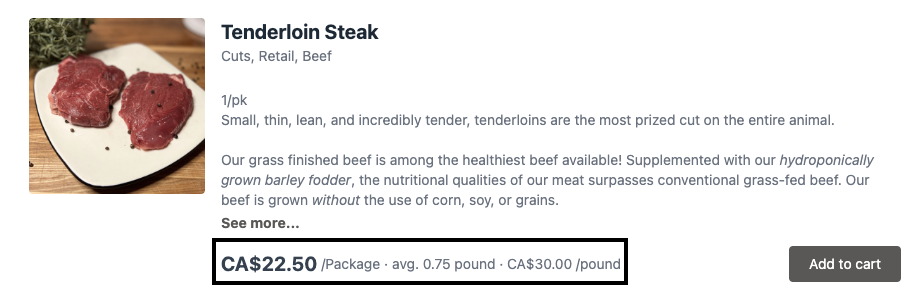
Why does selling by weight matter for livestock farmers selling online? It ensures you're getting accurate prices for the meat you're selling, which significantly impacts your bottom line over time. If you also sell bulk shares, make sure customers understand beef hanging weight vs. packaged weight, since bulk pricing is quoted on hanging weight rather than the packed cuts.
➡️ Curious to see selling by weight in practice? Check out how Wolf Creek Family Farm sells their meat by weight online.
Enter the LocalLine solution: selling by weight
LocalLine makes it possible to sell by weight online by introducing a variable weight workflow.
Variable weight workflow for meat producers
The variable weight workflow marks products that have variable weights (your meat products) with a Needs Approval tag. This means that when a product is ordered with variable weight, the customer is able to order the product; however, before the final price and invoice is sent, the seller is able to change the final weight of the order. The product is visible as a regular product in the storefront, but you as the seller have final say.
Let’s go through what this could look like for you in LocalLine step-by-step:
- When creating a product, choose to track the product by 'unit', but sell the product by ‘weight’ rather than by ‘item’.
- Indicate an average pack weight and a price per pound.
- Enable ‘orders with this product require approval.’ This adds the Needs Approval tag to the product.
- When customers order a product with this feature enabled, an order will be created in the back office of your LocalLine account. Orders requiring approval will be denoted by a yellow symbol beside the order number.
- When you are packing the order, go to your Orders table and click into the order.
- To approve an order, click on it and make the necessary adjustments. Click ‘Approve’ and ‘Save’ to bill your customer.
Managing payments when selling meat by weight online
There are two main ways to have your customers pay for their meat orders: pre-authorizing their credit card or having them pay later.
Pre-authorize your customer's credit card
When an order is placed on your online store, LocalLine will pre-authorize the customer’s credit card for the estimated price. After the order is weighed, the price is adjusted, and the order is approved, the customer’s credit card will be charged for the final amount.
Have your customers Pay Later

With the Pay Later functionality, instead of charging your customer’s credit card, your customer can pay the invoice at any point after you've packed their order. You can send a customer an invoice with the final weighed amount, and allow them to pay with a credit card or any other payment method you have available.
Here is what the payment screen will look like for a customer once the order has been approved and payment is requested.
Benefits of selling by weight with LocalLine
Track by unit or by weight, sell by unit or by weight
With LocalLine, you have ultimate flexibility when it comes to choosing how to track your products and how to sell your products. Every business and every product is different, so we leave it up to the farmer to choose how they best want to display, track, and sell their farm products. You also have all the flexibility when selecting how you define a unit (bushel, pack, each, box) and how you define weight (pounds, kg, L).
Automated calculations for price based on weight
When creating your product listings for variable-weight products, you select the price per weight unit and select an average price per unit. When a customer selects this product and checks out on your storefront, LocalLine will automatically calculate the final price based on the final weight. This will create an automated invoice for the customer with accurate pricing. To set the right price per pound in the first place, see our guide on how to price your meat.
Flexible payment options for your customers
Offer flexible payment options for your variable-weight products. If you use online payments, like LocalPay, pre-authorize your customers' cards and charge when the final weight has been inputted. If you use in-person payment options, like cash, you can also have your customers pay later at pick-up or delivery. Choose the option that makes the most sense for your customers and your business.
Frequently asked questions (FAQ) about selling meat by weight
Why does selling by weight matter for livestock farmers?
Selling by weight is essential because meat products vary in size and weight. Unlike standardized items, such as bread or produce, each cut of meat has a unique weight. Selling by weight ensures accurate pricing, preventing the risk of underselling or overcharging customers.
Can generic e-commerce platforms sell by weight?
Most generic e-commerce platforms track inventory by unit, such as selling loaves of bread at a fixed price. However, for variable-weight products like meat, LocalLine allows you to track by unit but sell by weight. This ensures accurate pricing and avoids potential revenue loss due to discrepancies in weight.
How does LocalLine charge the final weight?
LocalLine uses a variable weight workflow that marks products with variable weights as "Needs Approval." The customer's card is pre-authorized at checkout for the estimated price, the seller enters the actual packed weight before the invoice is sent, and the card is charged for exactly that amount. The product is visible in the storefront with an average cost, but the seller has the final say on the weight and pricing.
How can I manage payments when selling meat by weight online?
LocalLine offers two main payment options: pre-authorizing the customer's credit card or having customers pay later. Pre-authorizing charges the estimated amount, adjusting it based on the final weight. With the "Pay Later" option, customers receive an invoice with the final weighed amount and can pay using various methods.
Can I choose how to track and sell my products with LocalLine?
Yes, LocalLine provides ultimate flexibility. You can choose to track products by unit or weight and sell them by unit or weight. You have the freedom to define units (e.g., bushel, pack, each, box) and weight (pounds, kg, L) based on your business needs.
What benefits does LocalLine offer for selling meat by weight?
LocalLine offers benefits such as tracking by unit or weight, automated calculations based on weight, and flexible payment options. This empowers farmers to tailor their approach to meet the specific needs of their farm and customers.
How do you sell meat online?
To sell meat online successfully, start by choosing a reliable platform, like LocalLine, and ensuring compliance with food safety regulations. Utilize quality visuals and transparent product descriptions, implement a variable weight workflow like LocalLine's, and offer flexible pricing options to optimize sales. Establish efficient logistics, prioritize customer communication, and continuously monitor and optimize your strategy for long-term success in the online meat market.
How can I get started with LocalLine for online meat sales?
Begin your journey with LocalLine by starting a free trial today. Experience seamless farm e-commerce, improved customer management, and efficient business management tailored for selling meat online. Elevate your online meat sales strategy with LocalLine.